Why Agent Identity security matters more than ever
As organizations adopt autonomous AI agents – both custom‑built and platform‑provided, the identity layer becomes the new security perimeter. These agents authenticate, take actions, access data, and operate at machine speed. That makes Agent IDs in Microsoft Entra ID a critical component of your identity security strategy.
With the introduction of ID Protection for Agents and the new Risky Agent dashboard in Entra ID, we finally have dedicated visibility, detection, and automated control over AI agent identities.
What is Agent ID in Microsoft Entra ID?
Agent ID is Microsoft’s identity platform for autonomous AI agents. These identities can act independently, perform tasks on behalf of users, and interact with systems much like service principals, except with more dynamic behavior and potentially higher privilege surfaces.
Because agents make autonomous decisions and operate at scale, they can show unique behavioral patterns that require new detection logic and new controls. Microsoft addresses this with ID Protection for Agents (Now in preview).
Introducing the Risky Agent Dashboard
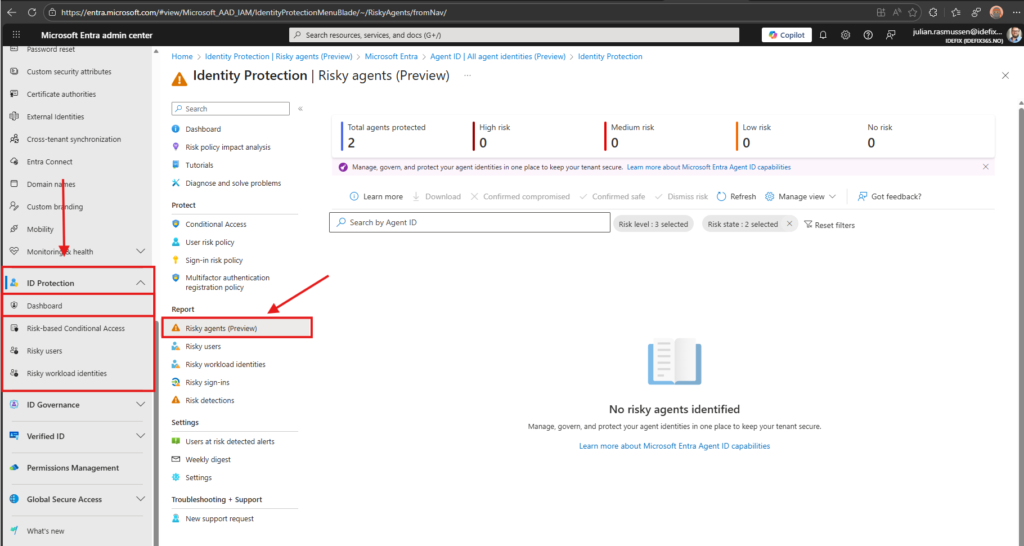
In Entra we now have a Risky Agent reporting experience as part of ID Protection. This dashboard gives administrators insights into:
- Agents flagged as risky
- Detected anomalies
- Agent sign‑in patterns
- Risk detections associated with the agent
The dashboard is available under:
Entra admin center → ID Protection → Risky agents
What makes an Agent “Risky”?
Entra ID Protection evaluates agents based on anomaly detection and behavioral baselines just like on regular users. Current risk detection types include:
- Unfamiliar resource access — accessing resources it normally never interacts with
- Sign‑in spike — unusually high volumes of authentication attempts
- Failed access attempts — repeated attempts to access unauthorized resources
- Sign‑in by risky user — delegated authentication using a compromised identity
All current detections are offline (evaluated after the event), but they still provide essential visibility for incident response and policy enforcement.
Why Risky Agent monitoring matters
AI agents often have:
- Access to sensitive business data
- Automation capabilities
- High execution velocity
- Permissions to act on behalf of users
A compromised agent could lead to large‑scale automated misuse. Being able to detect and automatically block risky agents is therefore essential.
Blocking Risky Agents with Conditional Access
Microsoft now allows administrators to use Agent Risk as a condition in Conditional Access policies. This means you can enforce risk‑based access for autonomous agents exactly as you do for users.
Per Microsoft documentation, you need at least the Conditional Access Administrator role to configure these policies.
Example: Block Authentication for Risky Agents
Here’s the high‑level approach:
- Go to:
Entra admin center → Protection → Conditional Access - Create a new policy
- Assignments → Target resources
Choose Agent identities (not users)
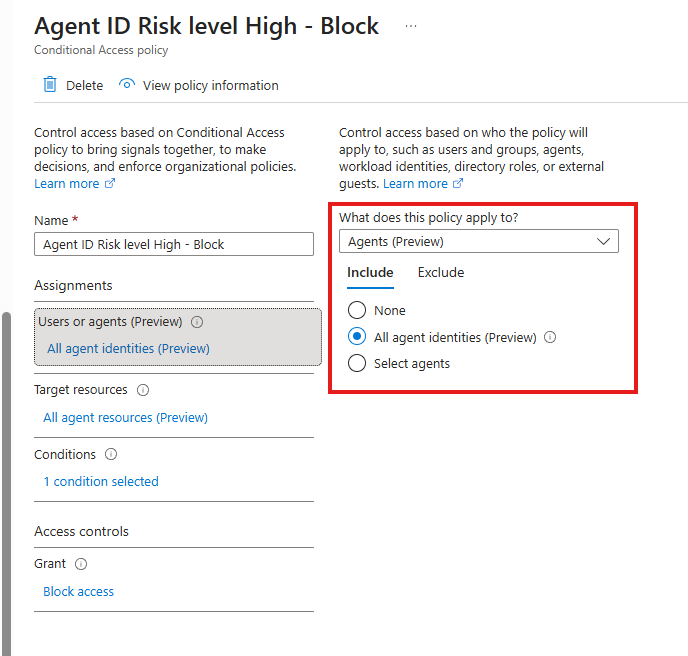
- Conditions → Agent risk
Set: Risk level = High
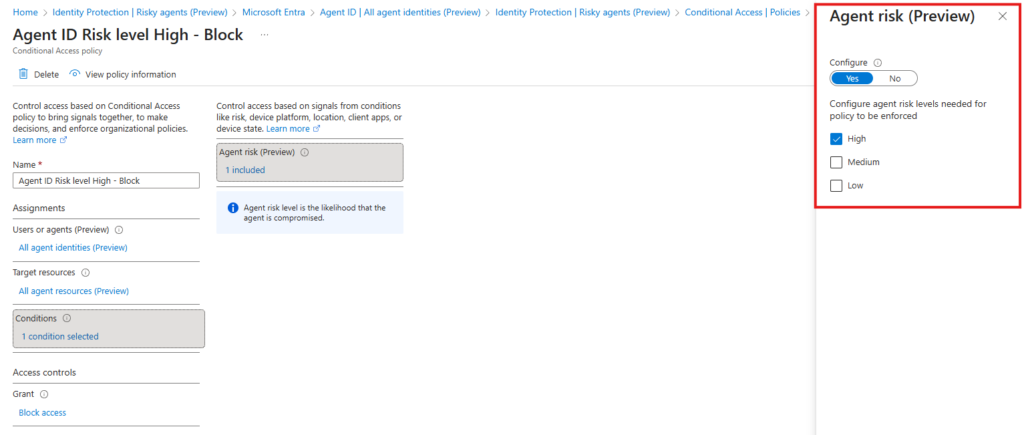
- Grant → Block access
- Enable policy
Best Practices for Securing Agent IDs
To protect agent identities effectively:
- Enable ID Protection for Agents (requires Entra ID P2 during preview)
- Review the Risky Agent dashboard daily
- Create a Conditional Access “High risk = block” policy
- Use least‑privilege application permissions for all agents
- Monitor agent sign‑in anomalies in parallel with user anomalies
- Automate alerts to SecOps or Sentinel
Agents are now first‑class identities. They need first‑class protection.
Conclusion
The rise of autonomous AI agents demands a modern approach to identity security. Microsoft’s introduction of Agent ID, Risky Agent detection, and risk‑based Conditional Access enforcement is a major step in securing AI operations.
If your organization is deploying Copilot extensions, custom autonomous agents, or API‑driven AI workflows, you must monitor and enforce risk on Agent IDs. The tools are now available, use them before attackers do!